
Newsletter
Stay Updated
Subscribe to FrontendGeek Hub for frontend interview preparation, interview experiences, curated resources and roadmaps.
Newsletter
Subscribe to FrontendGeek Hub for frontend interview preparation, interview experiences, curated resources and roadmaps.
Image Tools
Free HEIC to PDF converter online - Convert one or multiple HEIC or HEIF images into a high-quality PDF in Seconds. 100% Free, No Login, No Watermark, and Instant Conversion.
Related
Overview
HEIC to PDF conversion turns one or more HEIC (High Efficiency Image Container) photos — commonly saved by iPhones and iPads — into a portable PDF document. Each image typically becomes its own page, making it easy to share photos, scanned documents, and receipts as a single file that opens on any device.
How to use
Click the upload area and select one or more HEIC/HEIF photos from your device. You can upload up to 20 images at once.
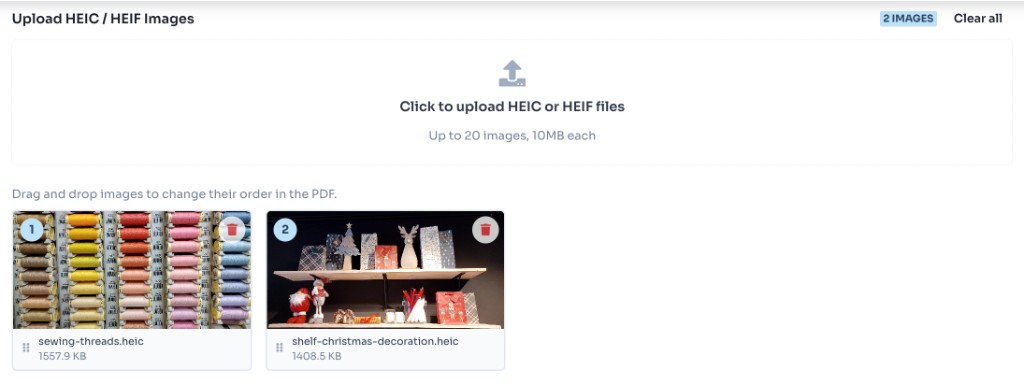
Preview uploaded thumbnails, remove unwanted files, and confirm the order. Each image will become one page in the final PDF.
Select page size (A4, Letter, or Fit to image), orientation, and margin based on how you want the PDF to look.

Click Convert & Download PDF. The tool decodes HEIC files and creates your PDF locally in the browser.
Why use it
Features
Convert HEIC and HEIF photos from iPhones and iPads directly in your browser.
All processing happens locally in your browser for fast results without uploads.
Your images never leave your device. Nothing is stored on our servers.
Choose A4, Letter, fit-to-image sizing, orientation, and margins before downloading.
FAQ
Quick answers about HEIC to PDF Converter.
Yes. FrontendGeek's HEIC to PDF converter is completely free to use with no signup required.
Help others discover this free tool
Explore