
JWT Token Decode/Encode
Free online JWT decoder and encoder. Decode JWT tokens to inspect header and payload, verify signatures, and create signed JWTs with HS256, HS384, or HS512 — all in your browser.
Enter secret key to verify the signature.
Explore Other Encoder/Decoders
What is a JWT Token?
A JSON Web Token (JWT) is a compact, URL-safe string used to securely transmit claims between parties. JWTs are commonly used for authentication and authorization in web APIs, single sign-on (SSO), and microservices.
Benefits:
• Self-contained: header, payload, and signature in one string
• Stateless authentication for REST APIs and SPAs
• Standard format (RFC 7519) supported by most languages and frameworks
• Signed tokens help detect tampering with header or payload
• Easy to inspect claims like user ID, roles, and expiration
A JWT has three Base64URL-encoded parts separated by dots: header (algorithm and type), payload (claims such as sub, exp, and custom data), and signature (proves the token was issued with a known secret or private key). Decoding a JWT reveals the claims; validating it confirms the signature and expiration.
Explain JWT Token Decode/Encode with Examples
A JWT is built from three dot-separated parts. Decoding reveals the JSON inside the header and payload. Encoding combines JSON claims with a secret to produce a signed token string.
JWT - Decode Example
Take this sample JWT (signed with HS256 and secret your-256-bit-secret):
JWT Token
eyJhbGciOiJIUzI1NiIsInR5cCI6IkpXVCJ9.
eyJzdWIiOiIxMjM0NTY3ODkwIiwibmFtZSI6IkpvaG4gRG9lIiwiaWF0IjoxNTE2MjM5MDIyfQ.
SflKxwRJSMeKKF2QT4fwpMeJf36POk6yJV_adQssw5c• Split the token on . — you get three parts: header, payload, and signature.
• Base64URL-decode the first part to read the header JSON.
• Base64URL-decode the second part to read the payload JSON.
• Use the secret to verify the third part (signature) has not been tampered with.
Decoded Header
{
"alg": "HS256",
"typ": "JWT"
}Decoded Payload
{
"sub": "1234567890",
"name": "John Doe",
"iat": 1516239022
}The sub claim is the subject (user ID), name is a custom claim, and iat is the issued-at timestamp (Unix seconds). No secret is needed to decode — only to verify the signature.
Encode Example
To create the same style of token, start with a header, payload, and secret:
Header
{
"alg": "HS256",
"typ": "JWT"
}Payload
{
"sub": "1234567890",
"name": "John Doe",
"iat": 1516239022
}Secret
your-256-bit-secret• Base64URL-encode the header JSON → first segment.
• Base64URL-encode the payload JSON → second segment.
• Join them as header.payload and sign with HMAC-SHA256 using your secret.
• Append the signature as the third segment after another dot.
Generated JWT
eyJhbGciOiJIUzI1NiIsInR5cCI6IkpXVCJ9.
eyJzdWIiOiIxMjM0NTY3ODkwIiwibmFtZSI6IkpvaG4gRG9lIiwiaWF0IjoxNTE2MjM5MDIyfQ.
SflKxwRJSMeKKF2QT4fwpMeJf36POk6yJV_adQssw5cPaste the header and payload into the Encode tab, enter the secret, choose HS256, and click Generate JWT to produce an identical signed token.
How to Decode and Encode JWT Tokens in code?
JWT encoding and decoding can be done in JavaScript, Python, or with this free online tool.
JavaScript
import { SignJWT, jwtVerify } from 'jose';
// Encode (sign) a JWT with HS256
const secret = new TextEncoder().encode('your-256-bit-secret');
const token = await new SignJWT({ name: 'John Doe' })
.setProtectedHeader({ alg: 'HS256', typ: 'JWT' })
.setSubject('1234567890')
.setIssuedAt(Math.floor(Date.now() / 1000))
.sign(secret);
// Decode and verify
const { payload, protectedHeader } = await jwtVerify(token, secret);
console.log(protectedHeader, payload);Python
import jwt
# Encode
token = jwt.encode(
{"sub": "1234567890", "name": "John Doe"},
"your-256-bit-secret",
algorithm="HS256",
)
# Decode (without verification — inspect only)
header = jwt.get_unverified_header(token)
payload = jwt.decode(token, options={"verify_signature": False})
# Validate signature
verified = jwt.decode(token, "your-256-bit-secret", algorithms=["HS256"])HTML
<!-- JWT is usually sent in Authorization header -->
fetch('/api/user', {
headers: {
Authorization: 'Bearer ' + token,
},
});Or use our free online tool above for instant results without writing code.
How to Decode JWT Token Using This Tool?
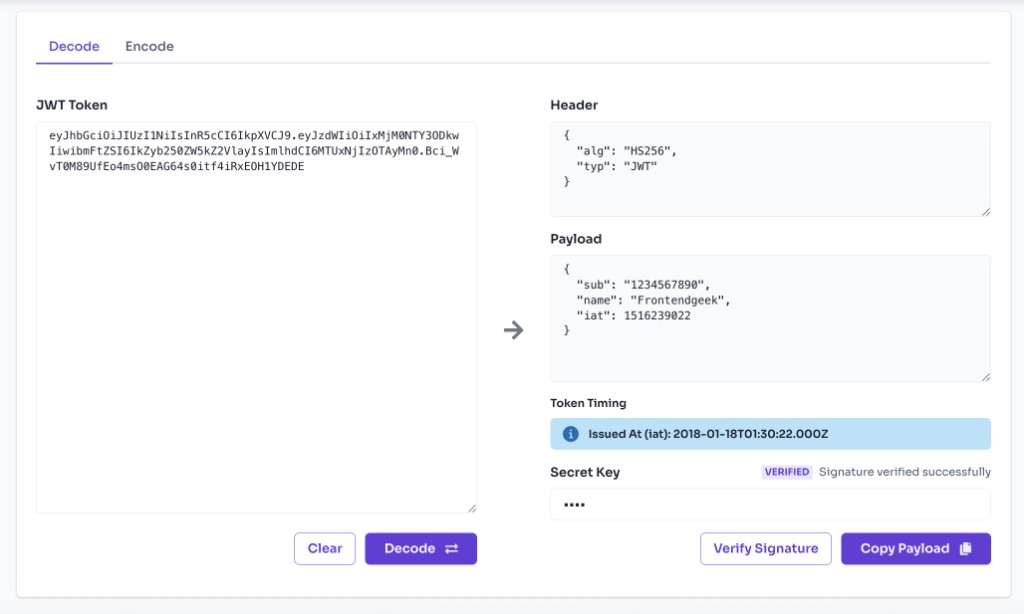
Use the Decode tab to paste any JWT and instantly view its header, payload, and optional signature verification.
Open the Decode Tab and Input JWT Token
Switch to Decode and paste your JWT token into the input field. The tool loads with a sample token so you can see how it works.
Inspect Header and Payload
The decoded header shows the algorithm (alg) and token type (typ). The payload shows claims like sub, name, exp, and any custom fields as formatted JSON.
Verify the Signature (Optional)
Enter your HMAC secret key in the verification field and click Verify Signature to check whether the token was signed with HS256, HS384, or HS512.
Review Expiration Claims
If the token includes exp, nbf, or iat claims, the tool displays human-readable dates and whether the token is expired or not yet valid.
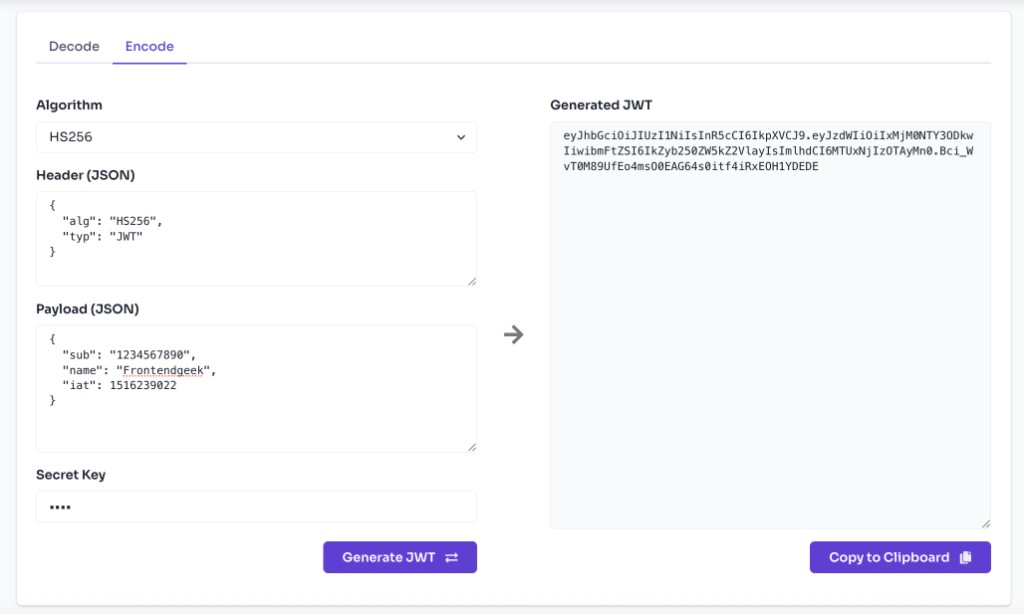
Encode a New JWT
Switch to the Encode tab, edit the header and payload JSON, choose an algorithm, enter a secret, and click Generate JWT to create a signed token.
Frequently Asked Questions
What is a JWT token?
A JWT (JSON Web Token) is a signed or unsigned string with three parts: header, payload, and signature. The header describes the signing algorithm; the payload holds claims (data about the user or session); the signature ensures the token has not been altered.
How to decode JWT token using this tool?
Paste your JWT into the Decode tab and click Decode. The tool splits the token on dots, Base64URL-decodes the header and payload, and displays them as readable JSON. No secret is required to decode — JWT payloads are only encoded, not encrypted.
How to validate a JWT token?
Validation has two parts: (1) verify the signature using the correct secret or public key, and (2) check time-based claims like exp (expiration) and nbf (not before). In this tool, paste the token, enter your HMAC secret, and click Verify Signature. Also review the expiration status shown below the payload.
Is decoding a JWT the same as validating it?
No. Anyone can decode a JWT to read its claims because encoding is not encryption. Validation confirms the signature is correct and the token is still valid (not expired). Always validate tokens on your server before trusting them.
Which algorithms does this tool support?
For encoding and signature verification, this tool supports HS256, HS384, and HS512 (HMAC with SHA-256/384/512). RS256 and other asymmetric algorithms are not supported in this browser tool.
Is my JWT or secret sent to a server?
No. All decoding, encoding, and signature verification runs locally in your browser. Your tokens and secrets never leave your device.
Can I decode a JWT without the secret?
Yes. Decoding only requires the token string. The secret is needed to verify or create signed tokens, not to read the header and payload.
What are common JWT claims?
Common registered claims include sub (subject/user ID), iss (issuer), aud (audience), exp (expiration time), nbf (not before), and iat (issued at). You can also add custom claims for roles, permissions, or app-specific data.
More Tools
Discover more free tools to boost your productivity
Gradient
HEX: #ff5733
RGB: 255, 87, 51
HEX: #4a90e2
RGB: 74, 144, 226
Blog Post
Transform your content...
Social Post
