
Newsletter
Stay Updated
Subscribe to FrontendGeek Hub for frontend interview preparation, interview experiences, curated resources and roadmaps.
Newsletter
Subscribe to FrontendGeek Hub for frontend interview preparation, interview experiences, curated resources and roadmaps.
Social Tools
Free YouTube Video Downloader Online Tool — Download YouTube MP4 video in Seconds. Fast Download & No Watermark.
By downloading, you agree to YouTube's Terms of Service.
Paste a YouTube video link to preview and download as MP4.
Supported Platforms
Related
Overview
A YouTube Video Downloader is an online tool that lets you download YouTube video files directly in your browser. Instead of installing desktop software or browser extensions, you paste a YouTube link, load the video details, play it in a built-in web player, and save an MP4 file after a free sign-in. FrontendGeek's YouTube Downloader is built for speed and simplicity: no watermark, and a clear workflow from URL to download. Whether you need to download a YouTube MP4 video for offline viewing on a flight, archive content you have rights to, or preview a clip before saving it, this YouTube Video Downloader keeps everything in one place.
How to use
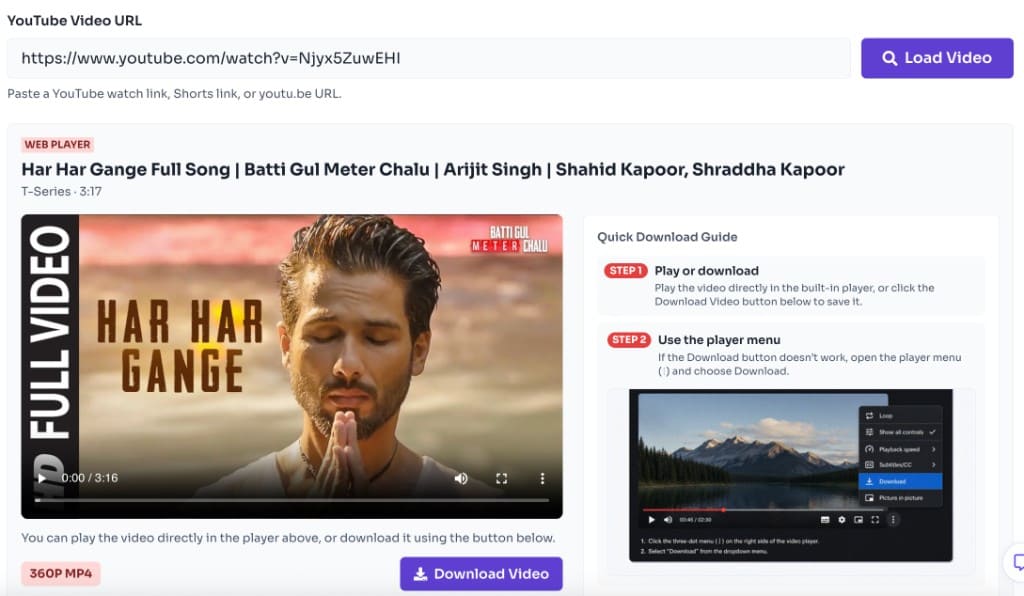
To download YouTube video content with this Video Downloader, paste a valid watch URL, Shorts link, or youtu.be link into the tool. The YouTube Downloader fetches video metadata, prepares a browser-playable stream, and lets you save an MP4 file after a free sign-in and the terms prompt. The process is designed to be straightforward: load the video, watch it if you want, then click Download Video.
How to use
Copy the video link from YouTube and paste it into the input box at the top of this YouTube Video Downloader. Standard watch links, Shorts links, and youtu.be URLs are all supported. If YouTube will not open while you try to grab the URL, check YouTube Down Detector — Is YouTube Down Right Now?.
Click Load Video to fetch the title, channel name, duration, thumbnail, and prepare the web player. This step tells the YouTube Downloader which stream to use before you download YouTube video files.

Use the built-in web player to watch the video online before you save it. The YouTube Video Downloader automatically selects the best playable quality so you can preview the clip without leaving the page.
Click Download Video, sign in for free if prompted, confirm the terms prompt, and save the file to your device. If the button does not work in your browser, use the player menu (⋮) as shown in the Quick Download Guide.
Why use it
Features
Preview videos for free, then sign in once to unlock MP4 downloads.
Watch before you save. Play the stream in your browser, then download YouTube MP4 video with one click.
Load video details in seconds. This YouTube Video Downloader fetches metadata and prepares playback without desktop software.
Use the YouTube Video Downloader for free with no watermark added to your downloaded MP4 files.
Download YouTube videos from the devices you carry every day. The tool is built for mobile browsers first and works just as smoothly on desktop — ideal when you want offline viewing on a commute, flight, or classroom tablet.
Generic download sites often bury the save button under pop-ups, fake quality buttons, or account walls. FrontendGeek's YouTube Video Downloader keeps a transparent path: load the clip, preview in the web player, choose quality, and save a watermark-free MP4 for videos you own or are allowed to archive — with no login required to download.
| Feature | FrontendGeek YT Downloader | Other YT Downloaders |
|---|---|---|
| Login to download | Not required — paste the URL and save | Often forces signup, captchas, or wait walls |
| Watermark on file | No watermark added to your MP4 | Many stamp a site logo on the video |
| Ads and pop-ups | Clean page focused on the download | Fake buttons, redirects, and malware risk |
| Software needed | Runs in the browser — no app or extension | Desktop installers or shady browser add-ons |
| Preview before save | Built-in web player on the same page | Download first, check the file later |
| Related tools | MP3, thumbnail, and MP4 converter nearby | One-off clone sites with no toolkit |
Use this YouTube Video Downloader only for videos you own, have licensed, or otherwise have permission to keep offline. Do not download copyrighted material for redistribution, piracy, or commercial reuse without rights. Respect creator copyright, YouTube's Terms of Service, and the laws where you live. FrontendGeek does not encourage unauthorized copying of other people's work.
Most download issues are quick to fix. Start with a public watch, Shorts, or youtu.be link, keep a stable connection while the stream prepares, and allow downloads in your browser.
Confirm the URL opens in YouTube and is a public watch, Shorts, or youtu.be link. Private, members-only, or broken channel pages will not load in the downloader.
Prefer Wi‑Fi for longer videos so the download does not stall on mobile data. Keep the tab open until the file starts saving to your device.
Disable aggressive ad blockers only if the player or Download Video button fails to appear. Some privacy extensions block the preview or download step.
If your current browser blocks file downloads, switch to Chrome, Safari, Edge, or Firefox and load the video again.
On iPhone, downloaded videos often land in Downloads inside the Files app rather than Photos. Check Files if the clip does not show in your camera roll.
If YouTube will not open while you grab the URL, check YouTube Down Detector before retrying the download.
FAQ
Quick answers about Free YouTube Video Downloader (MP4).
Yes. FrontendGeek's YouTube Video Downloader is free to use. You can preview and download MP4 files without creating an account or paying for a plan.
Guides
Step-by-step Instant Download help, format comparisons, and troubleshooting from the Tools Guide.
Languages
Help others discover this free tool
Explore
Quick Download Guide
How to download YouTube Video Online
Follow these steps to download from YouTube quickly.
Provide URL and click Download
Paste a YouTube URL, load the video preview, then click the Download button under the thumbnail.
Select required MP4 quality
Choose the MP4 video quality you need — the file is prepared immediately for automatic download in your browser.