
Newsletter
Stay Updated
Subscribe to FrontendGeek Hub for frontend interview preparation, interview experiences, curated resources and roadmaps.
Newsletter
Subscribe to FrontendGeek Hub for frontend interview preparation, interview experiences, curated resources and roadmaps.
Social Tools
Free Instagram Videos Downloader Online — Download Instagram to MP4 Instantly. Paste a video link and download MP4 video in seconds. Instant download, No Watermark.
Related
Overview
An Instagram Video Downloader lets you save video posts and Reels from Instagram to your device. Paste a public Instagram post or Reel URL, preview the video, and download the MP4 file when you are ready.
Why use this Instagram video downloader?
How to use
Open the Instagram video post or Reel and copy its link.

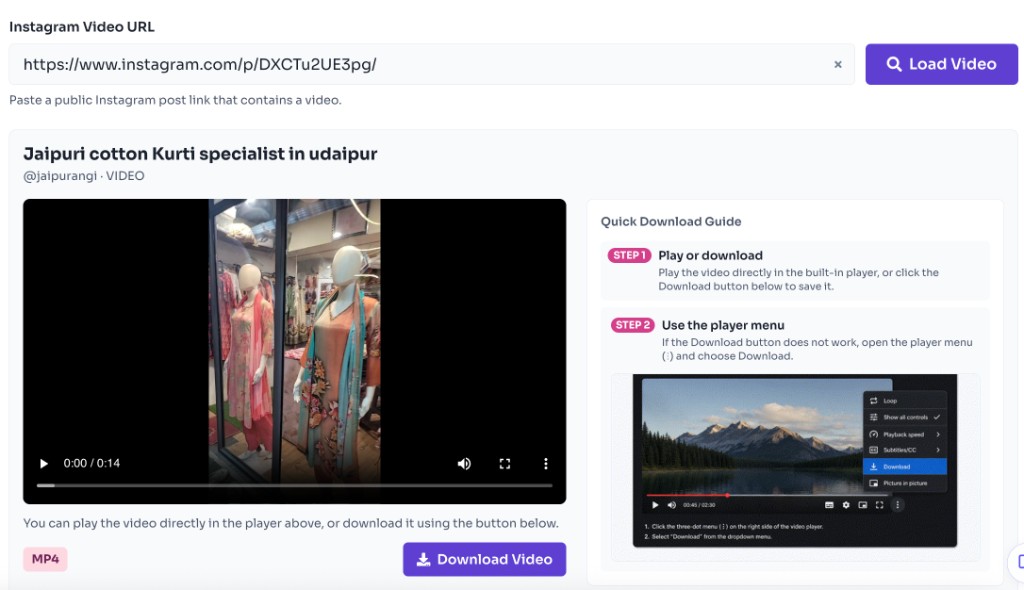
Paste the URL here and click Fetch Video.
Check the thumbnail and media details before downloading.
Sign in for free, click Download Video, and confirm the terms prompt to save the file.
Features
Preview media freely; a free sign-in unlocks the download.
See the thumbnail and media details before saving.
Works on phones, tablets, and desktop browsers.
No software installation or browser extension needed.
Many third-party sites stamp a logo on the file. This downloader saves a clean MP4 without adding a FrontendGeek watermark.
Paste a public post or Reel link. You never enter your Instagram login, unlike tools that ask for account access.
Confirm the thumbnail and video first so you save the right clip instead of downloading blindly.
No desktop app, cracked software, or browser extension. The same flow works on phone and desktop.
Preview is open to everyone. A free FrontendGeek sign-in unlocks the download — no paid credit packs.
Saves the highest quality Instagram provides for that video, typically HD up to 1080p, without extra compression from this tool.
FAQ
Quick answers about Free Instagram Video Downloader.
You can paste a public Instagram link and preview without an account. A free FrontendGeek sign-in is required to download.
Languages
Help others discover this free tool
Explore
Quick Download Guide
How to download Instagram Video
Use the video player menu to save the video as an MP4.
Open the menu
Click the ⋮ icon in the bottom-right of the player.
Download the video
Choose Download to save the video as MP4.